
Transformers documentation
ZoeDepth
このモデルは2023年2月23日にHF papersで公開され、2024年7月8日にHugging Face Transformersに貢献されました。
ZoeDepth
ZoeDepthは、単一の画像から相対深度推定(オブジェクト間の相対的な距離)とメトリック深度推定(メトリックスケールでの正確な深度測定)の汎化性能を組み合わせる深度推定モデルです。12のデータセットで相対深度、2つのデータセット(NYU Depth v2とKITTI)でメトリック精度について事前学習されています。各ドメイン用のメトリックビンモジュールを備えた軽量なヘッドが使用され、推論時には潜在分類器によって各入力画像に適したヘッドが自動的に選択されます。
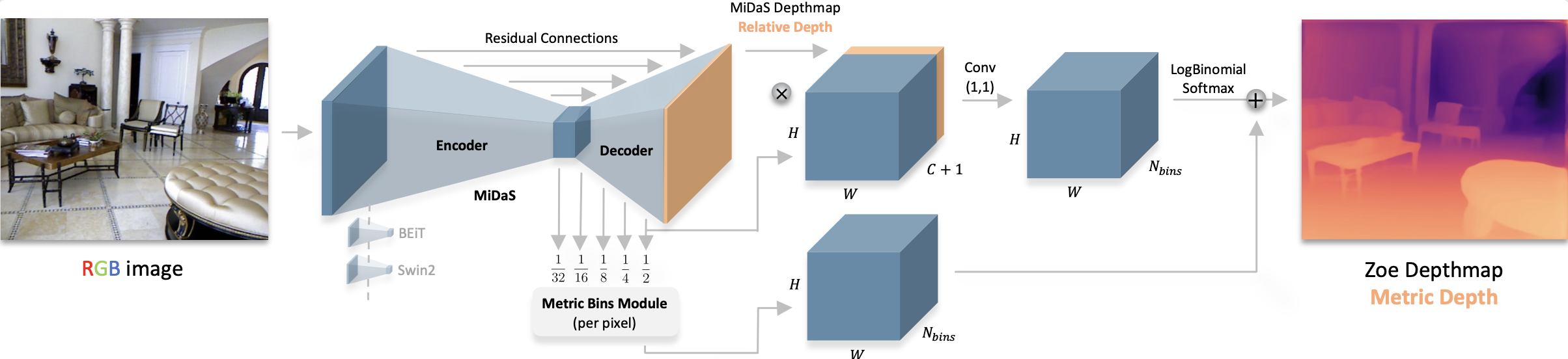
すべてのオリジナルのZoeDepthチェックポイントは、Intel組織の下で見つけることができます。
以下の例では、PipelineまたはAutoModelクラスを使用して深度を推定する方法を示しています。
import requests
from PIL import Image

from transformers import pipeline


url = "https://huggingface.co/datasets/huggingface/documentation-images/resolve/main/pipeline-cat-chonk.jpeg"
image = Image.open(requests.get(url, stream=True).raw)
pipeline = pipeline(
    task="depth-estimation",
    model="Intel/zoedepth-nyu-kitti",
    device=0
)
results = pipeline(image)
results["depth"]import requests
import torch
from PIL import Image
from transformers import AutoImageProcessor, AutoModelForDepthEstimation
image_processor = AutoImageProcessor.from_pretrained(
"Intel/zoedepth-nyu-kitti"
)
model = AutoModelForDepthEstimation.from_pretrained(
"Intel/zoedepth-nyu-kitti",
device_map="auto"
)
url = "https://huggingface.co/datasets/huggingface/documentation-images/resolve/main/pipeline-cat-chonk.jpeg"
image = Image.open(requests.get(url, stream=True).raw)
inputs = image_processor(image, return_tensors="pt").to(model.device)
with torch.no_grad():
outputs = model(inputs)
# interpolate to original size and visualize the prediction
## ZoeDepth dynamically pads the input image, so pass the original image size as argument
## to `post_process_depth_estimation` to remove the padding and resize to original dimensions.
post_processed_output = image_processor.post_process_depth_estimation(
outputs,
source_sizes=[(image.height, image.width)],
)
predicted_depth = post_processed_output[0]["predicted_depth"]
depth = (predicted_depth - predicted_depth.min()) / (predicted_depth.max() - predicted_depth.min())
depth = depth.detach().cpu().numpy() * 255
Image.fromarray(depth.astype("uint8"))注記
元の実装では、ZoeDepth は元画像と反転画像の両方で推論を実行し、その結果を平均化します。
post_process_depth_estimation関数は、以下に示すように、反転された出力を任意のoutputs_flipped引数に渡すことで、この処理を処理します。with torch.no_grad(): outputs = model(pixel_values) outputs_flipped = model(pixel_values=torch.flip(inputs.pixel_values, dims=[3])) post_processed_output = image_processor.post_process_depth_estimation( outputs, source_sizes=[(image.height, image.width)], outputs_flipped=outputs_flipped, )
リソース
- 推論の例については、このノートブックを参照してください。
ZoeDepthConfig
クラス transformers.ZoeDepthConfig
< source >( transformers_version: str | None = Nonearchitectures: list[str] | None = Noneoutput_hidden_states: bool | None = Falsereturn_dict: bool | None = Truedtype: str | torch.dtype | None = Nonechunk_size_feed_forward: int = 0is_encoder_decoder: bool = Falseid2label: dict[int, str] | dict[str, str] | None = Nonelabel2id: dict[str, int] | dict[str, str] | None = Noneproblem_type: Literal['regression', 'single_label_classification', 'multi_label_classification'] | None = Nonebackbone_config: dict | transformers.configuration_utils.PreTrainedConfig | None = Nonehidden_act: str = 'gelu'initializer_range: float = 0.02batch_norm_eps: float = 1e-05readout_type: typing.Literal['ignore', 'add', 'project'] = 'project'reassemble_factors: list[int | float] | tuple[int | float, ...] = (4, 2, 1, 0.5)neck_hidden_sizes: list[int] | tuple[int, ...] = (96, 192, 384, 768)fusion_hidden_size: int = 256head_in_index: int = -1use_batch_norm_in_fusion_residual: bool = Falseuse_bias_in_fusion_residual: bool | None = Nonenum_relative_features: int = 32add_projection: bool = Falsebottleneck_features: int = 256num_attractors: list[int] | tuple[int, ...] = (16, 8, 4, 1)bin_embedding_dim: int = 128attractor_alpha: int = 1000attractor_gamma: int = 2attractor_kind: typing.Literal['mean', 'sum'] = 'mean'min_temp: float = 0.0212max_temp: float = 50.0bin_centers_type: str = 'softplus'bin_configurations: list[dict] | None = Nonenum_patch_transformer_layers: int | None = Nonepatch_transformer_hidden_size: int | None = Nonepatch_transformer_intermediate_size: int | None = Nonepatch_transformer_num_attention_heads: int | None = None )
パラメータ
- backbone_config (
Union[dict, ~configuration_utils.PreTrainedConfig], 任意) — バックボーンモデルの設定です。 - hidden_act (
str、任意、デフォルトはgelu) — デコーダーで使用する非線形活性化関数(関数または文字列)。例えば、"gelu"、"relu"、"silu"など。 - initializer_range (
float、任意、デフォルトは0.02) — すべての重み行列を初期化するための truncated_normal_initializer の標準偏差です。 - batch_norm_eps (
float、任意、デフォルトは1e-05) — バッチ正規化レイヤーで使用する epsilon です。 - readout_type (
str, 省略可能, デフォルトは"project") — ViT バックボーンの中間隠れ状態の readout トークン(CLS トークン)を処理する際に使用する readout タイプです。"ignore","add","project"].- “ignore”はCLSトークンを単に無視します。
- 「add」は、表現を加算することにより、CLS トークンの情報を他のすべてのトークンに伝達します。
- “project” は、読み出しを他のすべてのトークンに連結してから、線形層と GELU 非線形性を適用して、表現を元のフィーチャ次元 D に射影することにより、他のトークンに情報を伝達します。
- reassemble_factors (
list[int]、任意、デフォルトは[4, 2, 1, 0.5]) — reassemble レイヤーの上/下サンプリング係数です。 - neck_hidden_sizes (
list[str]、任意、デフォルトは[96, 192, 384, 768]) — バックボーンのフィーチャマップを投影するための隠れ層サイズです。 - fusion_hidden_size (
int、任意、デフォルトは 256) — 融合前のチャネル数です。 - head_in_index (
int、任意、デフォルトは -1) — ヘッドで使用する特徴のインデックス。 - use_batch_norm_in_fusion_residual (
bool、任意、デフォルトはFalse) — fusion ブロックの pre-activate residual ユニットでバッチ正規化を使用するかどうか。 - use_bias_in_fusion_residual (
bool、任意、デフォルトはTrue) — fusion ブロックの pre-activate residual ユニットでバイアスを使用するかどうか。 - num_relative_features (
int、任意、デフォルトは 32) — 相対深度推定ヘッドで使用する特徴量の数。 - add_projection (
bool、省略可、デフォルトはFalse) — 深度推定ヘッドの前に投影層を追加するかどうか。 - bottleneck_features (
int、任意、デフォルトは 256)— ボトルネック層のフィーチャ数です。 - num_attractors (
list[int], *optional*, defaults to[16, 8, 4, 1]`) — 各ステージで使用するアトラクターの数を指定します。 - bin_embedding_dim (
int, 任意、デフォルトは 128) — ビン埋め込みの次元数です。 - attractor_alpha (
int、任意、デフォルト値は 1000)— アトラクターで使用する alpha 値です。 - attractor_gamma (
int、任意、デフォルト値は 2) — アトラクターで使用する gamma 値。 - attractor_kind (
str、任意、デフォルトは"mean") — 使用するアトラクターの種類です。"mean"または"sum"のいずれかです。 - min_temp (
float、任意、デフォルト値は 0.0212) — 考慮する最小の温度値です。 - max_temp (
float、任意、デフォルト値は 50.0) — 考慮する温度の最大値。 - bin_centers_type (
str、任意、デフォルトは"softplus") — ビンセンターに使用される活性化の種類です。“normed” または “softplus” を指定できます。“normed” の場合、線形正規化のトリックが適用され、ビンセンターは有界になります。“softplus” の場合、softplus 活性化が使用されるため、ビンセンターは無界になります。 - bin_configurations (
list[dict], 省略可, デフォルトは[{'n_bins' -- 64, 'min_depth': 0.001, 'max_depth': 10.0}]): 各ビンヘッドの設定。 各設定には、次のキーを含める必要があります:- name (
str): バインヘッドの名前 - 複数のバイン設定がある場合のみ必要です。 n_bins(int): 使用するバインの数。min_depth(float): 考慮する最小の深度値です。max_depth(float): 考慮する最大深度値。 単一の設定のみが渡された場合、モデルは指定された設定を持つ単一のヘッドを使用します。 複数の設定が渡された場合、モデルは指定された設定を持つ複数のヘッドを使用します。
- name (
- num_patch_transformer_layers (
int, 任意) — パッチトランスフォーマーで使用するトランスフォーマー層の数です。複数のビン設定の場合にのみ使用されます。 - patch_transformer_hidden_size (
int, 任意) — パッチトランスフォーマーで使用する隠れ層サイズ。複数のビン設定の場合にのみ使用されます。 - patch_transformer_intermediate_size (
int, 任意) — パッチトランスフォーマーで使用する中間サイズ。複数のビン設定の場合にのみ使用されます。 - patch_transformer_num_attention_heads (
int, 任意) — パッチトランスフォーマーで使用するアテンションヘッドの数です。複数のビン構成の場合にのみ使用されます。
これは Intel/zoedepth-nyu と同様の設定をデフォルト値で生成する、ZoedepthModel の設定を保存するための設定クラスです。指定された引数に基づいて Zoedepth モデルをインスタンス化し、モデルのアーキテクチャを定義するために使用されます。
設定オブジェクトはPreTrainedConfigを継承し、モデルの出力を制御するために使用できます。詳細については、PreTrainedConfigのドキュメントを参照してください。
例:
>>> from transformers import ZoeDepthConfig, ZoeDepthForDepthEstimation

>>> # Initializing a ZoeDepth zoedepth-large style configuration
>>> configuration = ZoeDepthConfig()

>>> # Initializing a model from the zoedepth-large style configuration
>>> model = ZoeDepthForDepthEstimation(configuration)

>>> # Accessing the model configuration
>>> configuration = model.config
ZoeDepthImageProcessor
class transformers.ZoeDepthImageProcessor
< source >( **kwargs: *<class 'transformers.models.zoedepth.image_processing_zoedepth.ZoeDepthImageProcessorKwargs'> )
パラメータ
- do_convert_rgb (
bool、kwargs、任意) — 画像を RGB に変換するかどうかを指定します。 - do_resize (
bool、kwargs、任意、デフォルトはTrue) — 画像をリサイズするかどうか。 - size (
Annotated[int | list[int] | tuple[int, ...] | dict[str, int] | None, None], kwargs、デフォルトは{'height' -- 384, 'width': 512}): モデルへの最大入力サイズを指定します。 - default_to_square (
bool、kwargs、任意、デフォルトはTrue) — size が int の場合、リサイズ時に正方形の画像をデフォルトとするかどうかを指定します。 - crop_size (
Annotated[int | list[int] | tuple[int, ...] | dict[str, int] | None, None], kwargs) —center_cropを適用した後の出力画像のサイズ。 - resample (
Annotated[Union[int, PILImageResampling, NoneType], None], kwargs, デフォルトは2) — 画像のリサイズ時に使用するリサンプリングフィルタです。PILImageResamplingの列挙型のいずれかを使用できます。do_resizeがTrueに設定されている場合のみ、効果が現れます。 - do_rescale (
bool、kwargs、任意、デフォルトはTrue) — 画像をリスケールするかどうかを指定します。 - rescale_factor (
float、kwargs、任意、デフォルト値は0.00392156862745098) —do_rescaleがTrueに設定されている場合、画像をリスケールするための係数です。 - do_normalize (
bool、kwargs、optional、デフォルトはTrue) — 画像を正規化するかどうかを指定します。 - image_mean (
Union[float, list[float], tuple[float, ...]]、kwargs、任意、デフォルトは[0.5, 0.5, 0.5]) — 正規化に使用する画像の平均値。do_normalizeがTrueに設定されている場合のみ有効です。 - image_std (
Union[float, list[float], tuple[float, ...]]、kwargs、optional、デフォルト値は[0.5, 0.5, 0.5]) — 正規化に使用する画像の標準偏差。do_normalizeがTrueに設定されている場合のみ有効です。 - do_pad (
bool、kwargs、optional、デフォルトはTrue) — 画像をパディングするかどうか。パディングは、バッチ内の最大サイズに合わせるか、画像ごとに固定の正方形サイズに合わせるかのいずれかで行われます。具体的なパディング戦略はモデルによって異なります。 - pad_size (
Annotated[int | list[int] | tuple[int, ...] | dict[str, int] | None, None], kwargs) — 画像をパディングする{"height": int, "width" int}のサイズです。前処理に提供されるすべての画像サイズより大きくなければなりません。pad_sizeが指定されない場合、バッチ内の最大の幅と高さにパディングされます。do_pad=True.の場合のみ適用されます。 - do_center_crop (
bool, kwargs, optional) — 画像を中央クロップするかどうかを指定します。 - data_format (
Union[str, ~image_utils.ChannelDimension]、kwargs、任意) — サポートされているのはChannelDimension.FIRSTのみです。slow processors との互換性のために追加されました。 - input_data_format (
Union[str, ~image_utils.ChannelDimension], kwargs, 省略可) — 入力画像のチャネル次元の形式です。設定されていない場合、入力画像からチャネル次元の形式が推測されます。次のいずれかになります:"channels_first"またはChannelDimension.FIRST: (num_channels, height, width) 形式の画像。"channels_last"またはChannelDimension.LAST: (高さ, 幅, チャネル数) 形式の画像。"none"またはChannelDimension.NONE: (height, width) 形式の画像。
- device (
Annotated[Union[str, torch.device, NoneType], None], kwargs) — 動画を処理するデバイスです。未設定の場合、入力動画からデバイスが推論されます。 - return_tensors (
Annotated[str | ~utils.generic.TensorType | None, None], kwargs) —'pt'に設定されている場合はスタックされたテンソルを返し、それ以外の場合はテンソルのリストを返します。 - disable_grouping (
bool、kwargs、任意) — サイズごとに画像をグループ化してバッチ処理するのではなく、個別に処理するためにグループ化を無効にするかどうか。None の場合、画像が CPU にある場合は True、それ以外の場合は False に設定されます。この選択は、https://github.com/huggingface/transformers/pull/38157 に詳しく記載されている経験則に基づいています。 - image_seq_length (
int、kwargs、任意) — 入力内の各画像に使用される画像トークンの数です。 後方互換性のために追加されましたが、将来のモデルではプロセッサの属性として設定されるべきです。 - keep_aspect_ratio (
bool、kwargs、任意、デフォルトはself.keep_aspect_ratio) —Trueの場合、高さおよび幅の拡大縮小係数のうち小さい方を採用して、両方の次元に適用することで画像をリサイズします。これにより、希望する出力サイズ内に収まることを保ちつつ、画像を可能な限り小さく縮小せずに済みます。ensure_multiple_ofも設定されている場合、高さと幅をこの値の倍数に切り捨てて、この値の倍数となるサイズにさらにリサイズされます。preprocess内のkeep_aspect_ratioによって上書きできます。 - ensure_multiple_of (
int、kwargs、optional、デフォルト値はself.ensure_multiple_of) —do_resizeがTrueの場合、画像はこの値の倍数となるサイズにリサイズされます。高さと幅をこの値の最も近い倍数に切り下げることで動作します。keep_aspect_ratioがTrueに設定されている場合でも、設定されていない場合でも動作します。preprocess内のensure_multiple_ofによって上書きできます。
ZoeDepthImageProcessor 画像プロセッサを構築します。
preprocess
< source >( images: typing.Union[ForwardRef('PIL.Image.Image'), numpy.ndarray, ForwardRef('torch.Tensor'), list['PIL.Image.Image'], list[numpy.ndarray], list['torch.Tensor']]**kwargs: *<class 'transformers.models.zoedepth.image_processing_zoedepth.ZoeDepthImageProcessorKwargs'> ) → ~image_processing_base.BatchFeature
パラメータ
- images (
Union[PIL.Image.Image, numpy.ndarray, torch.Tensor, list[PIL.Image.Image], list[numpy.ndarray], list[torch.Tensor]]) — 前処理対象の画像です。ピクセル値が 0 から 255 の範囲にある単一の画像またはバッチを想定しています。ピクセル値が 0 から 1 の範囲にある画像を渡す場合は、do_rescale=Falseを設定してください。 - do_convert_rgb (
bool、kwargs、任意) — 画像を RGB に変換するかどうかを指定します。 - do_resize (
bool、kwargs、optional) — 画像をリサイズするかどうか。 - size (
Annotated[int | list[int] | tuple[int, ...] | dict[str, int] | None, None], kwargs) — モデルへの最大入力次元を記述します。 - default_to_square (
bool、kwargs、任意) — サイズが整数の場合、リサイズ時に正方形の画像をデフォルトとするかどうか。 - crop_size (
Annotated[int | list[int] | tuple[int, ...] | dict[str, int] | None, None], kwargs) —center_cropを適用した後の出力画像のサイズ。 - resample (
Annotated[Union[int, PILImageResampling, NoneType], None], kwargs) — 画像のリサイズ時に使用するリサンプリングフィルタ。PILImageResamplingの列挙型のいずれかを使用できます。do_resizeがTrueに設定されている場合のみ有効です。 - do_rescale (
bool、kwargs、optional) — 画像をリスケールするかどうかを指定します。 - rescale_factor (
float、kwargs、任意) —do_rescaleがTrueに設定されている場合、画像をリスケールするための係数。 - do_normalize (
bool, kwargs, optional) — 画像を正規化するかどうかを指定します。 - image_mean (
Union[float, list[float], tuple[float, ...]]、kwargs、optional) — 正規化に使用する画像の平均値。do_normalizeがTrueに設定されている場合のみ有効です。 - image_std (
Union[float, list[float], tuple[float, ...]], kwargs, optional) — 正規化に使用する画像の標準偏差。do_normalizeがTrueに設定されている場合のみ有効です。 - do_pad (
bool, kwargs, optional) — 画像をパディングするかどうかを指定します。パディングは、バッチ内の最大サイズに合わせるか、画像ごとに固定の正方形サイズに合わせるかのいずれかで行われます。具体的なパディング戦略はモデルによって異なります。 - pad_size (
Annotated[int | list[int] | tuple[int, ...] | dict[str, int] | None, None], kwargs) — 画像をパディングする{"height": int, "width" int}のサイズです。前処理に提供されるすべての画像サイズより大きくなければなりません。pad_sizeが指定されない場合、バッチ内の最大の幅と高さにパディングされます。do_pad=True.の場合のみ適用されます。 - do_center_crop (
bool, kwargs, optional) — 画像を中央クロップするかどうかを指定します。 - data_format (
Union[str, ~image_utils.ChannelDimension]、kwargs、任意) — サポートされているのはChannelDimension.FIRSTのみです。slow processors との互換性のために追加されました。 - input_data_format (
Union[str, ~image_utils.ChannelDimension], kwargs, 省略可) — 入力画像のチャネル次元の形式です。設定されていない場合、入力画像からチャネル次元の形式が推測されます。次のいずれかになります:"channels_first"またはChannelDimension.FIRST: (num_channels, height, width) 形式の画像。"channels_last"またはChannelDimension.LAST: (高さ, 幅, チャネル数) 形式の画像。"none"またはChannelDimension.NONE: (height, width) 形式の画像。
- device (
Annotated[Union[str, torch.device, NoneType], None], kwargs) — 動画を処理するデバイスです。未設定の場合、入力動画からデバイスが推論されます。 - return_tensors (
Annotated[str | ~utils.generic.TensorType | None, None], kwargs) —'pt'に設定されている場合はスタックされたテンソルを返し、それ以外の場合はテンソルのリストを返します。 - disable_grouping (
bool、kwargs、任意) — サイズごとに画像をグループ化してバッチ処理するのではなく、個別に処理するためにグループ化を無効にするかどうか。None の場合、画像が CPU にある場合は True、それ以外の場合は False に設定されます。この選択は、https://github.com/huggingface/transformers/pull/38157 に詳しく記載されている経験則に基づいています。 - image_seq_length (
int、kwargs、任意) — 入力内の各画像に使用される画像トークンの数です。 後方互換性のために追加されましたが、将来のモデルではプロセッサの属性として設定されるべきです。 - keep_aspect_ratio (
bool、kwargs、任意、デフォルトはself.keep_aspect_ratio) —Trueの場合、高さおよび幅の拡大縮小率のうち小さい方を採用し、両方の次元に適用して画像をリサイズします。これにより、希望する出力サイズ内に収まることを保ちつつ、画像を可能な限り小さく縮小せずに処理できます。ensure_multiple_ofも設定されている場合、高さと幅をこの値の倍数に切り捨てて、この値の倍数となるサイズにさらにリサイズします。preprocess内のkeep_aspect_ratioによって上書きできます。 - ensure_multiple_of (
int、kwargs、optional、デフォルトはself.ensure_multiple_of) —do_resizeがTrueの場合、画像はこの値の倍数となるサイズにリサイズされます。高さと幅をこの値の最も近い倍数に切り捨てて処理を行います。keep_aspect_ratioがTrueに設定されている場合でも、設定されていない場合でも動作します。preprocess内のensure_multiple_ofによって上書きできます。
戻り値
~image_processing_base.BatchFeature
- data (
dict) — call メソッド(‘pixel_values’ など)によって返される、リスト/配列/テンソルの辞書。 - tensor_type (
Union[None, str, TensorType]、省略可) — 初期化時に PyTorch/Numpy の Tensor 内の整数リストを変換するために、ここで tensor_type を指定できます。
ZoeDepthImageProcessorPil
class transformers.ZoeDepthImageProcessorPil
< source >( **kwargs: *<class 'transformers.models.zoedepth.image_processing_pil_zoedepth.ZoeDepthImageProcessorKwargs'> )
パラメータ
- do_convert_rgb (
bool、kwargs、任意) — 画像を RGB に変換するかどうかを指定します。 - do_resize (
bool、kwargs、任意、デフォルトはTrue) — 画像をリサイズするかどうか。 - size (
Annotated[int | list[int] | tuple[int, ...] | dict[str, int] | None, None], kwargs、デフォルトは{'height' -- 384, 'width': 512}): モデルへの最大入力サイズを指定します。 - default_to_square (
bool、kwargs、任意、デフォルトはTrue) — size が int の場合、リサイズ時に正方形の画像をデフォルトとするかどうかを指定します。 - crop_size (
Annotated[int | list[int] | tuple[int, ...] | dict[str, int] | None, None], kwargs) —center_cropを適用した後の出力画像のサイズ。 - resample (
Annotated[Union[int, PILImageResampling, NoneType], None], kwargs, デフォルトは2) — 画像のリサイズ時に使用するリサンプリングフィルタです。PILImageResamplingの列挙型のいずれかを使用できます。do_resizeがTrueに設定されている場合のみ、効果が現れます。 - do_rescale (
bool、kwargs、任意、デフォルトはTrue) — 画像をリスケールするかどうかを指定します。 - rescale_factor (
float、kwargs、任意、デフォルト値は0.00392156862745098) —do_rescaleがTrueに設定されている場合、画像をリスケールするための係数です。 - do_normalize (
bool、kwargs、optional、デフォルトはTrue) — 画像を正規化するかどうかを指定します。 - image_mean (
Union[float, list[float], tuple[float, ...]]、kwargs、任意、デフォルトは[0.5, 0.5, 0.5]) — 正規化に使用する画像の平均値。do_normalizeがTrueに設定されている場合のみ有効です。 - image_std (
Union[float, list[float], tuple[float, ...]]、kwargs、optional、デフォルト値は[0.5, 0.5, 0.5]) — 正規化に使用する画像の標準偏差。do_normalizeがTrueに設定されている場合のみ有効です。 - do_pad (
bool、kwargs、optional、デフォルトはTrue) — 画像をパディングするかどうか。パディングは、バッチ内の最大サイズに合わせるか、画像ごとに固定の正方形サイズに合わせるかのいずれかで行われます。具体的なパディング戦略はモデルによって異なります。 - pad_size (
Annotated[int | list[int] | tuple[int, ...] | dict[str, int] | None, None], kwargs) — 画像をパディングする{"height": int, "width" int}のサイズです。前処理に提供されるすべての画像サイズより大きくなければなりません。pad_sizeが指定されない場合、バッチ内の最大の幅と高さにパディングされます。do_pad=True.の場合のみ適用されます。 - do_center_crop (
bool, kwargs, optional) — 画像を中央クロップするかどうかを指定します。 - data_format (
Union[str, ~image_utils.ChannelDimension]、kwargs、任意) — サポートされているのはChannelDimension.FIRSTのみです。slow processors との互換性のために追加されました。 - input_data_format (
Union[str, ~image_utils.ChannelDimension], kwargs, 省略可) — 入力画像のチャネル次元の形式です。設定されていない場合、入力画像からチャネル次元の形式が推測されます。次のいずれかになります:"channels_first"またはChannelDimension.FIRST: (num_channels, height, width) 形式の画像。"channels_last"またはChannelDimension.LAST: (高さ, 幅, チャネル数) 形式の画像。"none"またはChannelDimension.NONE: (height, width) 形式の画像。
- device (
Annotated[Union[str, torch.device, NoneType], None], kwargs) — 動画を処理するデバイスです。未設定の場合、入力動画からデバイスが推論されます。 - return_tensors (
Annotated[str | ~utils.generic.TensorType | None, None], kwargs) —'pt'に設定されている場合はスタックされたテンソルを返し、それ以外の場合はテンソルのリストを返します。 - disable_grouping (
bool、kwargs、任意) — サイズごとに画像をグループ化してバッチ処理するのではなく、個別に処理するためにグループ化を無効にするかどうか。None の場合、画像が CPU にある場合は True、それ以外の場合は False に設定されます。この選択は、https://github.com/huggingface/transformers/pull/38157 に詳しく記載されている経験則に基づいています。 - image_seq_length (
int、kwargs、任意) — 入力内の各画像に使用される画像トークンの数です。 後方互換性のために追加されましたが、将来のモデルではプロセッサの属性として設定されるべきです。 - keep_aspect_ratio (
bool、kwargs、任意、デフォルトはself.keep_aspect_ratio) —Trueの場合、高さおよび幅の拡大縮小率のうち小さい方を採用し、両方の次元に適用して画像をリサイズします。これにより、希望する出力サイズ内に収まる範囲で、画像をできるだけ小さく縮小せずに済みます。ensure_multiple_ofも設定されている場合、高さと幅をこの値の倍数に切り捨てて、この値の倍数となるサイズにさらにリサイズされます。preprocessのkeep_aspect_ratioで上書きできます。 - ensure_multiple_of (
int、kwargs、optional、デフォルト値はself.ensure_multiple_of) —do_resizeがTrueの場合、画像はこの値の倍数となるサイズにリサイズされます。高さと幅をこの値の最も近い倍数に切り下げることで動作します。keep_aspect_ratioがTrueに設定されている場合でも、設定されていない場合でも動作します。preprocess内のensure_multiple_ofによって上書きできます。
ZoeDepthImageProcessor 画像プロセッサを構築します。
preprocess
< source >( images: typing.Union[ForwardRef('PIL.Image.Image'), numpy.ndarray, ForwardRef('torch.Tensor'), list['PIL.Image.Image'], list[numpy.ndarray], list['torch.Tensor']]**kwargs: *<class 'transformers.models.zoedepth.image_processing_pil_zoedepth.ZoeDepthImageProcessorKwargs'> ) → ~image_processing_base.BatchFeature
パラメータ
- images (
Union[PIL.Image.Image, numpy.ndarray, torch.Tensor, list[PIL.Image.Image], list[numpy.ndarray], list[torch.Tensor]]) — 前処理対象の画像です。ピクセル値が 0 から 255 の範囲にある単一の画像またはバッチを想定しています。ピクセル値が 0 から 1 の範囲にある画像を渡す場合は、do_rescale=Falseを設定してください。 - do_convert_rgb (
bool、kwargs、任意) — 画像を RGB に変換するかどうかを指定します。 - do_resize (
bool、kwargs、optional) — 画像をリサイズするかどうか。 - size (
Annotated[int | list[int] | tuple[int, ...] | dict[str, int] | None, None], kwargs) — モデルへの最大入力次元を記述します。 - default_to_square (
bool、kwargs、任意) — サイズが整数の場合、リサイズ時に正方形の画像をデフォルトとするかどうか。 - crop_size (
Annotated[int | list[int] | tuple[int, ...] | dict[str, int] | None, None], kwargs) —center_cropを適用した後の出力画像のサイズ。 - resample (
Annotated[Union[int, PILImageResampling, NoneType], None], kwargs) — 画像のリサイズ時に使用するリサンプリングフィルタ。PILImageResamplingの列挙型のいずれかを使用できます。do_resizeがTrueに設定されている場合のみ有効です。 - do_rescale (
bool、kwargs、optional) — 画像をリスケールするかどうかを指定します。 - rescale_factor (
float、kwargs、任意) —do_rescaleがTrueに設定されている場合、画像をリスケールするための係数。 - do_normalize (
bool, kwargs, optional) — 画像を正規化するかどうかを指定します。 - image_mean (
Union[float, list[float], tuple[float, ...]]、kwargs、optional) — 正規化に使用する画像の平均値。do_normalizeがTrueに設定されている場合のみ有効です。 - image_std (
Union[float, list[float], tuple[float, ...]], kwargs, optional) — 正規化に使用する画像の標準偏差。do_normalizeがTrueに設定されている場合のみ有効です。 - do_pad (
bool, kwargs, optional) — 画像をパディングするかどうかを指定します。パディングは、バッチ内の最大サイズに合わせるか、画像ごとに固定の正方形サイズに合わせるかのいずれかで行われます。具体的なパディング戦略はモデルによって異なります。 - pad_size (
Annotated[int | list[int] | tuple[int, ...] | dict[str, int] | None, None], kwargs) — 画像をパディングする{"height": int, "width" int}のサイズです。前処理に提供されるすべての画像サイズより大きくなければなりません。pad_sizeが指定されない場合、バッチ内の最大の幅と高さにパディングされます。do_pad=True.の場合のみ適用されます。 - do_center_crop (
bool, kwargs, optional) — 画像を中央クロップするかどうかを指定します。 - data_format (
Union[str, ~image_utils.ChannelDimension]、kwargs、任意) — サポートされているのはChannelDimension.FIRSTのみです。slow processors との互換性のために追加されました。 - input_data_format (
Union[str, ~image_utils.ChannelDimension], kwargs, 省略可) — 入力画像のチャネル次元の形式です。設定されていない場合、入力画像からチャネル次元の形式が推測されます。次のいずれかになります:"channels_first"またはChannelDimension.FIRST: (num_channels, height, width) 形式の画像。"channels_last"またはChannelDimension.LAST: (高さ, 幅, チャネル数) 形式の画像。"none"またはChannelDimension.NONE: (height, width) 形式の画像。
- device (
Annotated[Union[str, torch.device, NoneType], None], kwargs) — 動画を処理するデバイスです。未設定の場合、入力動画からデバイスが推論されます。 - return_tensors (
Annotated[str | ~utils.generic.TensorType | None, None], kwargs) —'pt'に設定されている場合はスタックされたテンソルを返し、それ以外の場合はテンソルのリストを返します。 - disable_grouping (
bool、kwargs、任意) — サイズごとに画像をグループ化してバッチ処理するのではなく、個別に処理するためにグループ化を無効にするかどうか。None の場合、画像が CPU にある場合は True、それ以外の場合は False に設定されます。この選択は、https://github.com/huggingface/transformers/pull/38157 に詳しく記載されている経験則に基づいています。 - image_seq_length (
int、kwargs、任意) — 入力内の各画像に使用される画像トークンの数です。 後方互換性のために追加されましたが、将来のモデルではプロセッサの属性として設定されるべきです。 - keep_aspect_ratio (
bool、kwargs、任意、デフォルトはself.keep_aspect_ratio) —Trueの場合、高さおよび幅の拡大縮小率のうち小さい方を採用し、両方の次元に適用して画像をリサイズします。これにより、希望する出力サイズ内に収まる範囲で、画像をできるだけ小さく縮小せずに済みます。ensure_multiple_ofも設定されている場合、高さと幅をこの値の倍数に切り捨てて、この値の倍数となるサイズにさらにリサイズされます。preprocess内のkeep_aspect_ratioによって上書きできます。 - ensure_multiple_of (
int、kwargs、optional、デフォルトはself.ensure_multiple_of) —do_resizeがTrueの場合、画像はこの値の倍数となるサイズにリサイズされます。高さと幅をこの値の最も近い倍数に切り下げることで動作します。keep_aspect_ratioがTrueに設定されている場合でも、設定されていない場合でも動作します。preprocess内のensure_multiple_ofによって上書きできます。
戻り値
~image_processing_base.BatchFeature
- data (
dict) — call メソッド(‘pixel_values’ など)によって返される、リスト/配列/テンソルの辞書。 - tensor_type (
Union[None, str, TensorType]、省略可) — 初期化時に PyTorch/Numpy の Tensor 内の整数リストを変換するために、ここで tensor_type を指定できます。
ZoeDepthForDepthEstimation
クラス transformers.ZoeDepthForDepthEstimation
< source >( config: ZoeDepthConfig )
パラメータ
- config (ZoeDepthConfig) — モデルのパラメータをすべて含むモデル設定クラスです。設定ファイルで初期化しても、モデルに関連する重みは読み込まれず、設定のみが読み込まれます。モデルの重みをロードするには、from_pretrained() メソッドを参照してください。
ZoeDepthモデルは、その上に1つまたは複数のメトリック深度推定ヘッドを備えています。
このモデルは PreTrainedModel を継承しています。すべてのモデルに実装されている汎用的なメソッド(ダウンロードや保存、入力埋め込みのリサイズ、ヘッドのプルーニングなど)については、スーパークラスのドキュメントを参照してください。
このモデルは、PyTorchのtorch.nn.Moduleのサブクラスでもあります。 通常のPyTorch Moduleとして使用し、一般的な使用方法や動作に関する詳細については、PyTorchのドキュメントを参照してください。
forward
< source >( pixel_values: FloatTensorlabels: typing.Optional[torch.LongTensor] = Noneoutput_attentions: bool | None = Noneoutput_hidden_states: bool | None = Nonereturn_dict: bool | None = None**kwargs ) → DepthEstimatorOutput or tuple(torch.FloatTensor)
パラメータ
- pixel_values (
torch.FloatTensor、shape(batch_size, num_channels, image_size, image_size)) — 入力画像に対応するテンソルです。ピクセル値は ZoeDepthImageProcessor を使用して取得できます。詳細については ZoeDepthImageProcessor.call() を参照してください(processor_classは画像の処理に ZoeDepthImageProcessor を使用します)。 - labels (
torch.LongTensor、形状(batch_size, height, width)、任意) — 損失の計算に使用する正解の深度推定マップです。 - output_attentions (
bool, 省略可) — すべてのアテンション層のアテンションテンソルを返すかどうかを指定します。詳細は、返されるテンソルのattentionsを参照してください。 - output_hidden_states (
bool, 省略可) — すべての層の hidden states を返すかどうかを指定します。詳細は、返されるテンソルのhidden_statesを参照してください。 - return_dict (
bool, 任意) — プレーンなタプルではなく ModelOutput を返すかどうか。
戻り値
DepthEstimatorOutput または tuple(torch.FloatTensor)
torch.FloatTensor のタプル、または DepthEstimatorOutput(return_dict=False が渡された場合、または config.return_dict=False の場合)。設定(ZoeDepthConfig)や入力に応じて、さまざまな要素で構成されます。
ZoeDepthForDepthEstimationのforwardメソッドは、__call__特殊メソッドをオーバーライドします。
この関数内でフォワードパスの手順を定義する必要がありますが、その後、この関数ではなく
Moduleインスタンスを呼び出すべきです。前者は前処理と後処理の実行を適切に処理するのに対し、後者はそれらを黙って無視するためです。
loss (
torch.FloatTensor、shape(1,)、optional、labelsが指定された場合に返されます) — 分類損失(config.num_labels==1 の場合は回帰損失)。predicted_depth (
torch.FloatTensor、形状(batch_size, height, width)) — 各ピクセルの予測深度。hidden_states (
tuple(torch.FloatTensor)、optional、output_hidden_states=Trueが渡された場合またはconfig.output_hidden_states=Trueの場合に返される) —torch.FloatTensorのタプル(埋め込み層を持つモデルの場合、埋め込みの出力が 1 つ、各層の出力がそれぞれ 1 つずつ)で、形状は(batch_size, num_channels, height, width)です。各層の出力におけるモデルのHidden-states、および任意の初期埋め込み出力。
attentions (
tuple(torch.FloatTensor)、optional、output_attentions=Trueが渡された場合またはconfig.output_attentions=Trueの場合に返されます)—torch.FloatTensorのタプル(各レイヤーごとに1つ)、形状は(batch_size, num_heads, patch_size, sequence_length)。アテンションのsoftmax後のアテンション重み。自己アテンションヘッド内で加重平均を計算するために使用されます。
例:
>>> from transformers import AutoImageProcessor, ZoeDepthForDepthEstimation
>>> import torch
>>> import numpy as np
>>> from PIL import Image
>>> from huggingface_hub.utils import httpx
>>> from io import BytesIO

>>> url = "http://images.cocodataset.org/val2017/000000039769.jpg"
>>> with httpx.stream("GET", url) as response:
...     image = Image.open(BytesIO(response.read()))

>>> image_processor = AutoImageProcessor.from_pretrained("Intel/zoedepth-nyu-kitti")
>>> model = ZoeDepthForDepthEstimation.from_pretrained("Intel/zoedepth-nyu-kitti")

>>> # prepare image for the model
>>> inputs = image_processor(images=image, return_tensors="pt")

>>> with torch.no_grad():
...     outputs = model(**inputs)

>>> # interpolate to original size
>>> post_processed_output = image_processor.post_process_depth_estimation(
...     outputs,
...     source_sizes=[(image.height, image.width)],
... )

>>> # visualize the prediction
>>> predicted_depth = post_processed_output[0]["predicted_depth"]
>>> depth = predicted_depth * 255 / predicted_depth.max()
>>> depth = depth.detach().cpu().numpy()
>>> depth = Image.fromarray(depth.astype("uint8"))